 ShieldBrain
How Many Reels Do You Watch a Day? Count Them — the Answer Will Shock You
Quick answer: Almost certainly far more than you think. Regular short-video users scroll 100–500 Reels, Shorts and TikToks a day — several hours of watch time — while estimating "maybe 30 minutes". A reels counter app like ShieldBrain measures your real number automatically on Android, and that number is the beginning of the fix.
What is a reels counter?
A reels counter is an app that automatically counts every short-form video you scroll through — each Instagram Reel, YouTube Short, TikTok, Facebook Reel and Snapchat Spotlight video — and turns the count into daily, weekly and lifetime statistics. Where your phone's screen-time report says "Instagram: 2h 14m" (which could be DMs or stories), a reels counter answers the sharper question: how many videos did the feed feed you?
Why the number matters: you can't fix what you don't measure
Self-estimates of scrolling are wildly wrong for a reason: short-video sessions are designed to be timeless. No clocks, no endpoints, instant context-switching — the feed erases your sense of duration. Behavioural research is consistent on the fix: self-monitoring alone reduces a behaviour, because it converts a fog ("I scroll a bit too much") into a fact ("I watched 482 reels today").
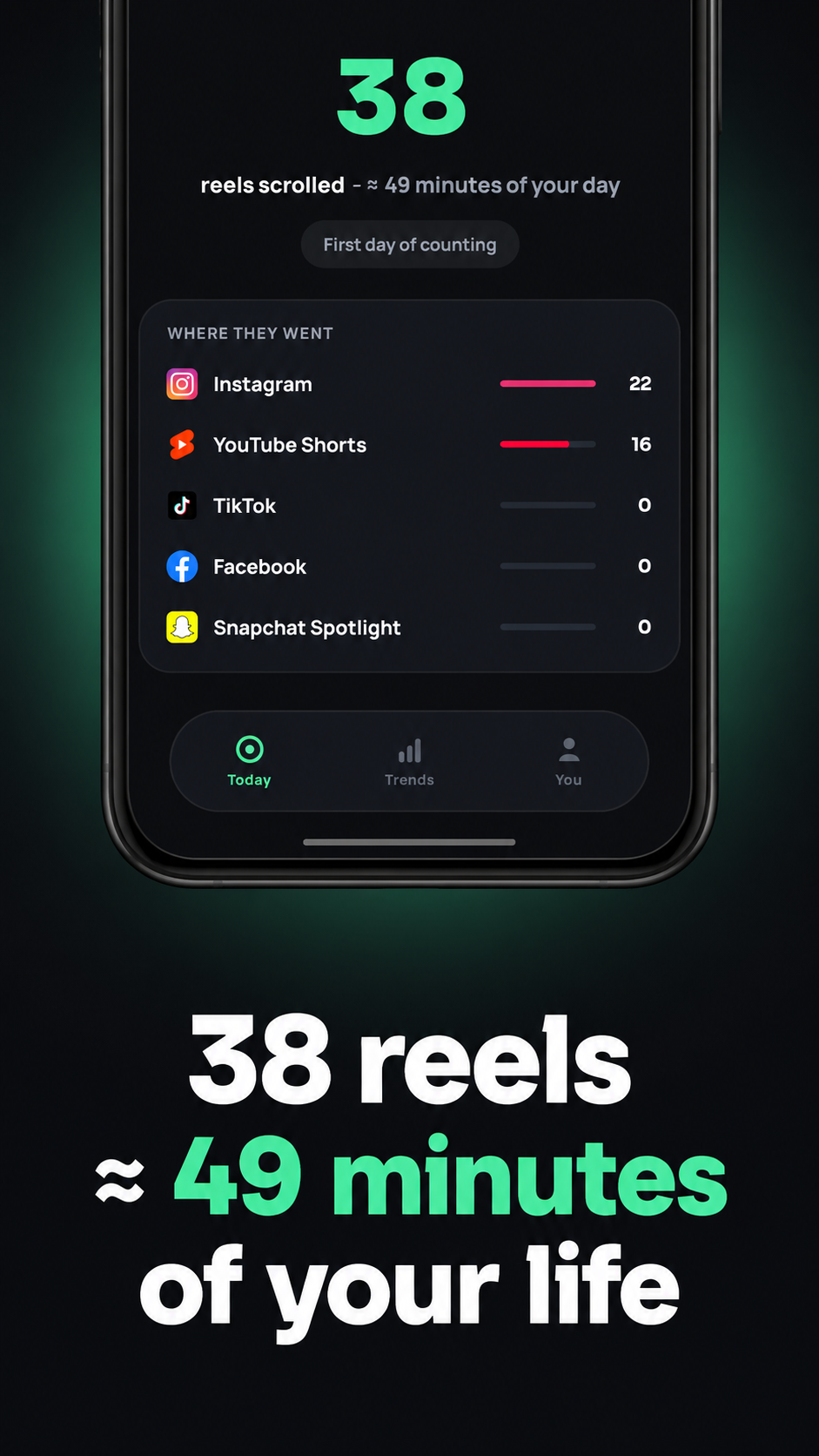
Facts have edges. "482 reels" at roughly 60–90 seconds per reel is 8+ hours — a full workday. Even a moderate 38 reels is about 49 minutes, as ShieldBrain shows right on its dashboard. When the cost has a number, the trade-off becomes real: that's the gym session, the chapter, the early night you didn't have.
How ShieldBrain's reels counter works
- Install ShieldBrain (free, Android, no account).
- Enable the Accessibility Service — the one-time permission that lets ShieldBrain recognise short-video feeds on screen. Counting happens 100% on your device; nothing is uploaded, ever.
- Live your normal life. ShieldBrain counts silently in the background.
What you get:
- Today count — live number of reels scrolled plus estimated minutes.
- Where they went — per-app breakdown across Instagram, YouTube Shorts, TikTok, Facebook and Snapchat Spotlight, so you know which feed owns you.
- Trends — weekly chart and monthly calendar of your scrolling history.
- Brain Report Card — a weekly shareable grade from Brainy, the app's mascot.
What to do with your number
If it's under ~50 a day
You're a light scroller. Keep the counter running as a guard-rail; consider blocking just your one sticky platform.
If it's 50–200 a day
That's 1–3 hours daily. Pick your worst app from the breakdown and block its feed first — see blocking Instagram Reels, YouTube Shorts or TikTok.
If it's 200+ a day
You're losing a part-time job's worth of hours weekly. Block all five platforms in ShieldBrain and run the 7-day dopamine detox. The first three days are the hardest; the counter's drop becomes its own motivation.
Common mistakes
- Trusting screen-time totals. App-level minutes mix messaging with scrolling; a reels counter isolates the actual habit.
- Counting forever without acting. The counter is step one. ShieldBrain's blocker — one toggle per platform — is step two.
- Quitting the count after blocking. Keep it on: flat-zero weeks and A+ report cards are the proof your brain is back.
FAQ
Is there an app that counts how many reels you watch?
Yes — ShieldBrain counts every Reel, Short, TikTok, Facebook Reel and Spotlight video automatically on Android, free and fully on-device.
How many reels does the average person watch per day?
Regular users commonly scroll 100–500 short videos daily — roughly 1.5 to 8 hours of watching. Most people underestimate their count several-fold.
Why does counting reels help you stop?
Tracking converts a vague habit into a concrete number, and self-monitoring measurably reduces the behaviour being tracked. The number also shows progress once you start blocking.
Find out your real number
ShieldBrain counts every reel you scroll — silently, privately, free. The answer will shock you.
Get ShieldBrain on Google PlayRelated guides: Stop doomscrolling · Dopamine detox guide · Reduce screen time on Android